This blog walks you through how to open a Wise Business account, step by step. It covers what Wise looks for during approval, the documents you’ll need, and how to set things up correctly so you can get approved without unnecessary back-and-forth.
14.8 million customers, businesses, and banks use Wise every day, moving $16 billion each month. And because moving money at that volume invites risk, Wise leans hard into safety controls.
It’s regulated nationwide, holds 65+ licences worldwide, keeps customer money in a safeguarded, separate account, and runs about 7 million checks every day to detect and stop fraud.
In recent years, Wise Business account has gained traction among founders, particularly those with cross-border revenue, cross-border expenses, or both.
Basically, Wise Business is an online account built to run international finances without the usual bank friction.
You can hold and convert 40+ currencies, and use the same account to send payments to 160+ countries. Conversions are based on the mid-market exchange rate and fees shown before you confirm. That transparency is the point.
In addition, Wise is extremely compliance-driven. So, your experience depends a lot on how your company is set up and how clean and perfect your paperwork is. If your details match and your docs are in order, it’s usually smooth. If not, you’ll end up in that annoying verification maze.
But don’t worry. We have your back. In this blog, we’ll walk through how to open a Wise Business account, what Wise typically asks for, and how to get it right the first time so you don’t lose days chasing approvals.
What Is a Wise Business Account?
First things first: Wise is not a bank. It operates as a Money Services Business (MSB) provider. That matters because Wise is built for moving and converting money, not for lending, overdrafts, or traditional banking services.
In addition, Wise Business account is designed for companies that operate across borders and want an alternative to bank-based international transfers.
It lets you receive payments using local account details, hold multiple currencies in one place, and convert funds at the mid-market exchange rate with fees shown upfront.
And on pricing, Wise keeps it simple and straightforward.
There are no monthly account fees or hidden charges. Instead, you pay only when you send money or convert currencies, and the full cost is displayed inside your Wise account before you complete the transaction.
| Wise Handles Transfers. Not Payroll. Not Banking. Wise can send payouts to contractors and employees, but it won’t calculate salaries, handle tax withholdings, manage benefits, or file payroll reports. You’ll still need a payroll/EOR provider like Deel, Remote, Gusto, or a local payroll partner. And Wise isn’t a full replacement for a domestic bank, no cash deposits, cheque handling, or branch services. Most businesses keep a local bank and use Wise for cross-border movement. |
Key Features of the Wise Business Account
Here’s what you get with a Wise Business account.
Local Account Details To Receive International Payments
Wise Business lets you generate local bank account details in major currencies (for example, USD, EUR, GBP), subject to country eligibility.
Practically, this means customers or platforms can pay you as if you were a local business, instead of sending an international wire.
This reduces payment friction, avoids unnecessary SWIFT fees, and speeds up collections, especially useful if you bill overseas clients regularly or operate across markets.
No Monthly Account Fees (One-Time Setup Cost)
Wise does not charge a monthly maintenance fee for the business account. Instead, there’s a one-time setup fee to activate account details.
After that, you pay only when you move or convert money. This structure works well for businesses that don’t want fixed banking overhead and prefer usage-based costs tied directly to activity.
Receive Payouts From Platforms Like Amazon Or Via Stripe
Wise Business accounts can be used as the destination bank account for payouts from platforms such as Amazon or payment processors like Stripe.
In simple terms, Wise acts as the bank account where your platform earnings land. This helps international businesses avoid opening a traditional bank account in every country they sell in, while still receiving funds through standard payout rails.
Free Invoicing Tool
Wise includes a basic invoicing feature that lets you create and send invoices directly from your account. You can use the Wise invoice generator or templates to request payment into your Wise account.
This is useful for service businesses or consultants who need a simple way to bill clients without running a full accounting or billing system.
Accounting Integrations (Including QuickBooks Bill Pay)
Wise integrates with accounting software such as QuickBooks, including a Bill Pay connection. Payments made through Wise can be synced into QuickBooks, where they’re matched and categorized automatically.
This reduces manual reconciliation work and keeps your books aligned with actual cash movement, which is especially helpful for finance teams managing cross-border payments.
Wise Business Account: Pros, Cons, and Limitations
This section breaks down what a Wise Business Account does well, where it falls short, and the practical limits you should know before using it in your finance setup.
Wise Business Account: Pros
✔️ Transparent FX Pricing
Wise uses the mid-market exchange rate and shows the conversion fee upfront. No spread baked into the rate. This matters if FX cost hits your margins directly.
✔️ Local Receiving Accounts In Key Markets
You can receive money using local bank details (for example, US routing numbers or EU IBANs). This reduces reliance on SWIFT and lowers friction for international clients.
✔️ Batch Payments At Scale
Wise supports batch payouts via CSV/XLSX uploads, up to 1,000 payments at once. Useful for contractor payouts, affiliate programs, or marketplace-style disbursements.
✔️ Business Debit Cards For Global Spend
Where available, Wise business cards work across multiple currencies and countries. Good for SaaS subscriptions, travel, and cross-border operating expenses.
✔️ Automation And API Support
Wise supports integrations and APIs for payouts and reconciliation. This is relevant for ops-heavy teams that want payments to run without manual intervention.
Wise Business Account: Cons
❌ Not A Full Banking Product
Wise doesn’t offer business loans, lines of credit, or deposit-based financing you’d normally get from a bank. That’s because the platform is built for moving and converting money, not for lending or credit services.
This means:
- You cannot borrow cash or raise capital directly from Wise.
- You won’t get credit limits or overdraft protection.
❌ SWIFT Receiving Comes With Fees
Wise’s core strength is low-cost global transfers, but not all receiving methods are free.
Receiving money into local currencies using account details (like non-wire GBP, EUR, USD in some cases) can be free or low-cost, but SWIFT / international wire payments often carry a fixed fee per incoming transfer.
❌ Strict Onboarding And Verification
Wise follows strict compliance rules before a business account goes live. That means you’ll have to provide:
- Business registration details
- Legal entity documentation (incorporation, directors, shareholders)
- Identity verification (IDs, sometimes biometrics)
- Explanation of business activity and how you’ll use the account
Wise collects this to meet global regulatory and anti-money-laundering requirements, and it can flag mismatches. Even if everything is legal, sometimes onboarding takes longer when documents don’t match exactly or require further validation.
Wise Business Account: Limitations
👉🏼 Feature Availability Is Country-Dependent
Wise is jurisdiction-based. Your feature set depends on where you and/or the business is located, and Wise maintains a feature availability checker to confirm what’s supported by country, for this reason.
This isn’t a small detail. It impacts real features like:
- Local account details (receiving accounts): Wise says you must reside in a region where those account details are supported. If you move to a region where, say, USD account details aren’t available, then Wise may deactivate those USD details.
- Cards: Wise card availability depends on the country. Wise has published a list of eligible countries and regions. In case you didn’t know, business customers in Malaysia are currently not eligible for the Wise card.
Founder takeaway: Don’t assume your teammate in another country gets the same Wise features you do.
👉🏼 Not Built For Payroll Or Tax Compliance
Wise can help you send payouts (including “payroll-style” batch payments), but it’s not a payroll system.
Wise itself frames this as using Wise to send payroll payments (for example via spreadsheet upload), not to run payroll (salary calculations, statutory deductions, filings).
Related to taxes, Wise is clear that customers are responsible for disclosing and paying any required taxes tied to transfers or money received, and they recommend seeking tax advice if unclear.
👉🏼 Not A Payment Gateway
Wise is not a payment gateway. This means it doesn’t offer services typical of a gateway, such as:
- Card processing and handling card data
- Implementing subscription billing logic
- Handling disputes or chargeback workflows
Wise can facilitate payment requests (via invoices or payment links) so money is paid into your Wise account, but this is distinct from full payment gateway functionality.
Who Is Eligible to Open a Wise Business Account?
You’re generally eligible if you fall into one of the business types Wise explicitly supports such as sole traders/freelancers, limited or public companies, partnerships, and charities/trusts.
Eligibility is also country-linked. Check the entire list here.
Opening the account is straightforward, but it’s not “instant.”
Wise may require verification before you can complete transfers, which typically means proving who you are and confirming the business details.
| Supported Business Types
Wise accepts these legal business structures, subject to country eligibility and compliance checks: ✔️ Sole Traders / Freelancers: Individuals running a business under their name or a trade name. ✔️ Limited Companies: Standard corporate entities in many jurisdictions (e.g., Ltd in UK, Pty Ltd in Australia). ✔️ Public Companies: In regions where Wise supports them. ✔️ Partnerships / LLPs: Formal business partnerships where two or more people share ownership. ✔️ Charities / Trusts: Where Wise specifically allows non-profits in supported regions (like EEA, UK, US, Canada, Australia, NZ). |
📌 Keep in mind: While these entity types are broadly supported, the exact eligibility can vary by country and industry. Wise checks your business type and registration during signup and may decline based on location or prohibited activities.
Wise Doesn’t Work For:
Charities And Trusts Outside Supported Regions
Wise supports charities/trusts only in specific regions. If a charity/trust is registered outside those supported regions, Wise won’t onboard it.
Unregistered Charities
If the charity isn’t formally registered, it’s not eligible, regardless of country.
Prohibited Or Restricted Industries
Wise won’t support businesses involved in certain categories such as cryptocurrency, tobacco, and adult content, along with other restricted activities listed in its Acceptable Use / prohibited activities documentation.
Use the official list as the source of truth, because this keeps evolving.
Superannuation Funds And SMSFs In Australia
Wise states it doesn’t support Superannuation Funds or Self Managed Superannuation Funds (SMSF) in Australia.
Cuba-Related Goods Or Services With US Connections
Wise won’t support businesses offering goods/services relating to Cuba where there are US relations/sanctions implications. Practically, if your business has Cuba-related activity and a US nexus, expect ineligibility.
Businesses With Bearer Shares
If your company has bearer shares, Wise won’t onboard it, no matter where the company is incorporated.
| How Eligibility Ties Back To Proper Company Formation?
Eligibility for a Wise Business account isn’t about where you live, it’s about how cleanly your company is formed. Wise underwrites the entity, not the founder. If your business is properly registered in a supported jurisdiction, has a clear legal structure (LLC, corporation, sole proprietor, etc.), and consistent documentation (name, address, directors, ownership), onboarding is usually straightforward, even for non-US residents. Founders run into trouble is sloppy formation due to mismatched addresses, unclear ownership, bearer shares, unregistered entities, or jurisdictions that Wise doesn’t support. Those issues surface immediately during verification and often lead to delays or rejection. |
When Non-US Residents Can Open a Wise Business Account
You can open a Wise Business account even if you’re not a US citizen or resident as long as your business meets Wise’s eligibility rules and is registered in a supported country.
| 📍 Core Conditions For Non-US Residents
1. Your Company Must Be Legally Registered If you want Wise to provide account details, especially US routing numbers, your business must be officially registered in a supported jurisdiction (for example the US itself or another market where Wise Business is available). 2. US Business Requirements (If You Want US Details) To get US account details (like a routing/payments number) as a non-US founder, you’ll generally need: ✔️ A US-registered entity (e.g., LLC or corporation) ✔️ A US business operating address: This lets Wise issue US-based receiving details even if you personally are not in the US. 3. No US Social Security Number Needed 4. Local Version Works Too If your business is registered outside the US but in any region Wise supports, you can open a Wise Business account in that home country and still get access to multi-currency features and local receiving details in certain markets. |
What You Need Before Opening a Wise Business Account
Before you apply for a Wise Business account, make sure the basics are in place. Wise’s onboarding is compliance-driven, so gaps or inconsistencies in documents submission can slow things down and delay approvals.
Here are a few must-haves for opening a Wise Business account:
A Properly Registered Business
Your business must be legally incorporated or registered in a country Wise supports. Your entity details should be clear with proper legal name, registration number, and structure (LLC, corporation, sole trader, partnership, etc.).
Verified Owners And Controllers
Wise will verify directors, owners, or controlling persons. Expect to submit government-issued ID and, in some cases, proof of address. Ownership needs to be transparent.
Consistent Business Information
Your business name, address, and ownership details need to match across documents. Mismatches between incorporation papers, invoices, or your website are common reasons for delays or follow-ups.
Clarity On What Your Business Does
Wise requires a clear description of your business model and how you’ll use the account (receiving client payments, paying contractors, converting FX, etc.). This is standard AML practice, and it matters more if your industry sits in a higher-risk category.
A Supported Jurisdiction
Eligibility depends on where the business is registered and, in some cases, where key people are based. Also, feature availability (like local account details and cards) is country-specific. So, check this upfront.
Key Documents You’ll Be Asked For
Business Registration Documents
Proof the entity legally exists. Typically: certificate of incorporation/registration, business license, or an equivalent document showing legal name, registration number, and jurisdiction.
Ownership And Control Information
Details of directors, shareholders, and anyone with significant control. Wise needs a clean ownership structure with no ambiguity.
Identity Verification (KYC)
Government-issued photo ID for directors/owners (passport or national ID). In some cases, proof of residential address is also required.
Business Address Proof
A registered or operating address that matches your formation documents. Inconsistencies here often trigger reviews.
Description Of Business Activity
A short, accurate explanation of what the business does and how the Wise account will be used (platform payouts, vendor payments, FX conversion, etc.).
Tax Identification Number
If your business is US-registered, Wise typically requires a valid EIN to verify the entity.
If your business is registered outside the US, Wise uses the local equivalent (company registration number or national business ID). An EIN is not required in that case.
Supporting Evidence (If Requested)
Depending on your activity, Wise may ask for supporting material like contracts, invoices, a website URL, or platform profiles (e.g., Amazon/Stripe), to validate how money will flow.
Step-by-Step: How to Open a Wise Business Account
Registering an account with Wise Business is a pretty simple and straightforward process that you can complete online in minutes.
Ready to open a Wise Business account? Let’s get started.
Step 1: Head to the Wise Business Website
Start by visiting the Wise Business website in your web browser, or download and open the Wise mobile app from the Apple App Store or Google Play.
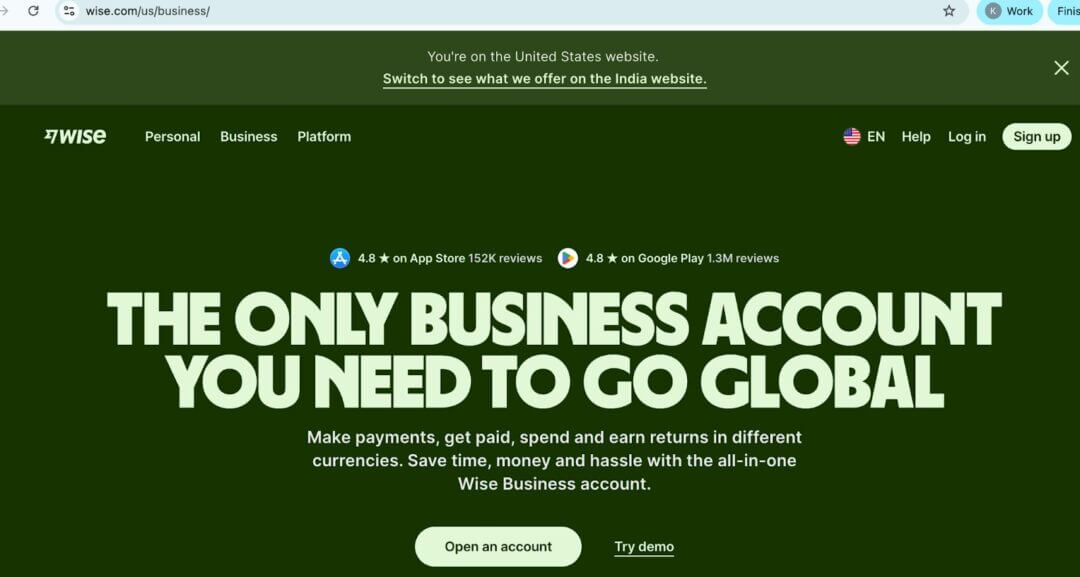
Step 2: Select ‘Register’ in the Top Right Corner
On the website, click the Register button in the top right corner, or choose Create account. You can also use the provided link to register.

Step 3: Enter Your Business Email Address
Provide the email address you use for business correspondence. Alternatively, you can sign up using an existing Google, Facebook, or Apple ID if your business email is registered there.

Step 4: Pick Your Business Location
Confirm your country of registration.

Step 5: Add Your Phone Number for 2-Step Verification
Enter a mobile number to receive a one-time password (OTP) by SMS, then input the OTP to complete two-step verification and secure your account.
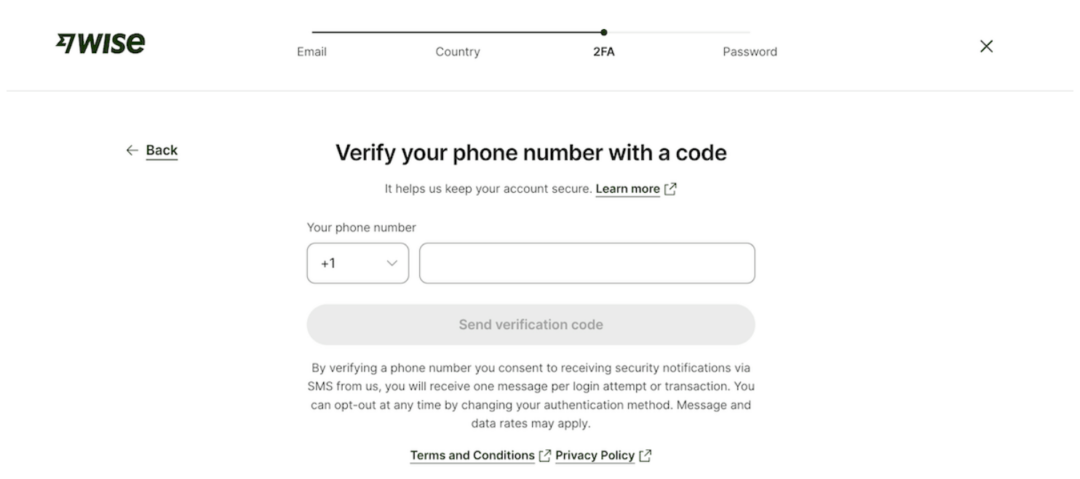
Step 6: Create a Strong Password
Set a password that combines upper- and lower-case letters, characters, and numbers, and is difficult to crack.
Step 7: Confirm Your Role in the Business
Tell Wise whether you are one of multiple stakeholders or the majority owner of the business.
Step 8: Verify Your Business with Wise
To continue, you need to submit documentation to verify both your identity and the business. This includes details such as:
- Business registration information
- Registered business address and trading address(es)
- Information about the industry the business operates in
- Links to the business website and social media
- Name, date of birth, and country of residence for all stakeholders
- Purposes the business account will be used for
As the account owner, you need to provide personal information to verify your identity. If you are not a company director, you should be able to prove that you are authorized to act on behalf of the business.
You need to upload the following documents:
- Copy of the company director’s passport or ID card
- Proof of business address(es), such as a utility bill issued within the last three months, a copy of a bank or credit card statement, a tax bill, or a notification
- Business formation documents, such as Articles of Association and Memorandum of Association
- Business ownership agreements
- Business license, if applicable
Step 9: Set up a Transfer or Get Account Details
Enter the amount you want to send, specify who you’re sending to, and pay for the transfer.
Alternatively, you can pay a one-time set-up fee to get account details for receiving money.
Once Wise receives your money, their team will let you know if they need additional information to verify your identity. If you added team members to your business account, they need to be verified as well.
After verification is completed, Wise will send a confirmation email and resume your transfer.
| How Long Does It Take to Open a Wise Business Account? You can open a Wise Business account in a matter of minutes when your documents are ready. There’s no appointment to schedule and no queues to deal with. Verification usually completes in under 10 working days. Wise will email you as soon as verification is complete, or if they need anything else. If your transfer was paused for verification, it will resume once verification gets sorted. |
Tips To Avoid Rejection When Opening A Wise Business Account
Based on user reports across public forums and communities (including Reddit), Wise account rejections are commonly linked to documentation gaps, inconsistent business information, or unclear descriptions of business activity.
Here’s how to reduce the risk of that happening.
Keep Your Entity Details Clean And Consistent
Your legal business name, registration number, address, and ownership details must match everywhere, from incorporation documents, invoices, website, to platforms you link. Even small mismatches can trigger reviews and delays.
Have The Right Tax ID Ready
If you’re a US entity, make sure your EIN is issued and active before applying. If you’re non-US, ensure your local business registration number is valid and verifiable. Missing or pending tax IDs are a common blocker.
Be Clear About What Your Business Does
Avoid vague descriptions like “consulting” or “online services.” Clearly state what you sell, who pays you, and how money will move through the account. Wise uses this to assess risk and payment flows.
Disclose Ownership Transparently
List all directors, shareholders, and controlling persons accurately. Do not omit stakeholders or use unclear ownership structures. Bearer shares or unclear control almost always lead to rejection.
Check Industry Restrictions Upfront
Wise restricts certain industries (e.g., crypto-related services, adult content, tobacco, sanctioned regions). If your business touches a restricted area, expect extra scrutiny or ineligibility, don’t try to “word around” it.
Use A Verifiable Business Presence
Have a working website, platform profile, or basic online presence that aligns with your application. Wise may ask for links to validate that the business is real and operating as described.
Prepare Supporting Documents In Advance
Contracts, invoices, platform payout screenshots (Amazon, Stripe, etc.) help if Wise asks follow-up questions. Being able to respond quickly reduces delays.
Don’t Rush Formation Just To Apply
Accounts formed hastily, with temporary addresses, placeholder descriptions, or incomplete ownership records, get flagged very fast. Clean formation from the start saves time later.
Sign up to know more about clean and compliant formations.
Wise Business Account Cost And Fees
Wise has no monthly fees or minimum balance. Wise is transparent about fees, aiming to help your business save money.
| 📌 Pay Attention!
With the free Wise Business signup, you can open the account and start using certain features, but you can’t receive payments via local bank account details until you activate them. In the US, Wise states you need to pay a one-off $31 fee to unlock these account details. Once you pay that fee, Wise gives you major currency account details (where available), so customers can pay you like a local (for example, using domestic bank transfers instead of international wires). This makes collections simpler and can reduce friction for overseas clients. For example, you can get a UK sort code and account number even as a US business, allowing your UK customers to pay into local UK account details. This streamlines payments for your customers and provides certainty about the exact amount you’ll receive. You can then easily exchange the GBP to USD, or your preferred currency, all within your Wise Business account. |
Here’s the breakdown:
1. Account Opening Fee
- Free registration: You can sign up and open a Wise Business account without a monthly fee.
- One-time fee for local account details: To unlock local bank details (e.g., USD, EUR, GBP), which you need to receive payments like a local, there is typically a one-off setup fee (e.g., ≈ $31 USD in the US).
- No hidden subscription costs: You only pay for the features you use.
2. Wise Business Local Transfers ( In & Out )
Domestic / Local (Non-SWIFT / Non-Wire)
Free to receive domestic transfers in major currencies (AUD, CAD, EUR, GBP, HUF, NZD, SGD, TRY, USD).
This applies to local bank transfers that aren’t SWIFT/wire payments, banks sending within the same country/rail.
SWIFT / Wire Incoming
If you receive payments via SWIFT/wire into your Wise Business account, Wise charges a fixed fee per incoming transfer: $6.11 for USD wire/SWIFT, £2.16 for GBP SWIFT, and €2.39 for EUR SWIFT.
👉🏼 Key Takeaway: Receiving local (domestic) transfers in supported currencies is free. Fees apply only when the incoming payment arrives via SWIFT/wire.
Adding Money (Inbound Transfers You Initiate)
Free to add money to your Wise Business account by bank transfer in the same currency.
Some payment methods (e.g., card funding or certain rails) may attract a small fee, Wise will show it before you confirm.
| 📌 What “Local Transfers” Really Means
Domestic / Local (Non-SWIFT): Bank transfers within the same country/rail (e.g., a GBP Faster Payment, EUR SEPA, USD ACH) that don’t use SWIFT. These are typically free to receive if you have Wise account details in that currency. SWIFT / Wire: Cross-border or international bank messaging system transfers. These attract a fixed, low fee per incoming payment in addition to any sending bank’s charges. |
| Supported Currencies On Wise | Business & Personal
Wise supports 50+ currencies for holding and transfers. However, holding a currency ≠ getting local account details for that currency. That distinction matters. Visit the Wise website for details. |
Wise for International & Non-US Founders: What You Must Know
Wise focuses on approving the business entity, not the individual founder. For a non-US/international founder, Wise will evaluate the company based on:
- Where the company is legally registered.
- Whether that registration country is supported by Wise.
- Whether the company’s entity type is supported.
- Whether all submitted documents are complete and consistent.
- Whether the business activity is permitted by Wise.
A failure in any of these areas can result in the account being delayed, limited, or rejected.
Here are a few things you need to know if you are an international or a non-US founder:
| 📌 Founder Residency Doesn’t Matter. Company Setup Does.
You don’t need to be a US citizen or resident to use Wise. What Wise evaluates is the business entity, where it’s registered, how it’s structured, and whether it operates in a supported jurisdiction. A founder in India, Europe, or elsewhere can use Wise if the company itself meets eligibility rules. US companies need an EIN (but not an SSN). If you’re a non-US founder with a US LLC or corporation, Wise typically expects a valid EIN to verify the business. You do not need an SSN or ITIN to open the account, but the EIN is critical. Without it, onboarding usually gets delayed. Local account details are not guaranteed everywhere. Wise can provide local receiving details (like US routing numbers or EU IBANs), but availability depends on where the business is registered and where key individuals are based. This is why two founders using Wise may have very different feature access. Non-US founders should expect periodic checks. Changes in transaction size, new payment patterns, or incomplete documentation can trigger follow-ups. Keeping entity details and business activity descriptions consistent matters long after approval. 🚀 doola’s take: Wise can be a strong option for international and non-US founders, but only if the company is validly formed, properly registered, and transparent. |
How doola Helps You Open and Use a Wise Business Account

As we said in the previous section, Wise approval often hinges on correct entity setup, proper documentation, and strict compliance. And that’s exactly where doola steps in to support founders.
Let’s take a look at how doola helps founders build a strong foundation that Wise and other financial platforms can approve quickly.
🚀 US LLC Or C-Corp Formation: Done Right From The Start
🚀 EIN & Tax Registrations: Simplified And Included
🚀 Compliance & Ongoing Filings: Keeping You In Good Standing
Instead of puzzling over formation rules, IRS forms, or regulatory filings, which often cause Wise rejections, doola gives you a structured, compliant business entity with ready-to-use documentation. That makes your Wise Business account application smoother and helps you maintain eligibility long-term.
Get Your Business Wise-Ready!
FAQs
Can I open a Wise Business account without registering a company?
Yes, if you’re a sole trader or freelancer in a supported country. If you’re applying as a company (LLC, corporation, partnership, etc.), Wise requires a legally registered entity with proper documentation.
Can non-US residents open a Wise Business account?
Yes. Non-US residents can open a Wise Business account as long as the business is registered in a supported country and meets Wise’s eligibility rules. If you have a US LLC or C-Corp, you’ll typically need an EIN, but you don’t need an SSN or ITIN.
How long does Wise Business account approval take?
Approval timelines vary, but verification usually completes within 10 working days once all required documents are submitted. Missing or inconsistent information can extend this.
Why was my Wise Business account application rejected?
Common reasons include incomplete or inconsistent documents, unclear business activity, unsupported jurisdictions, or restricted industries. Rejections usually relate to compliance checks, not arbitrary decisions.
Does Wise replace a traditional business bank account?
No. Wise is best used as a cross-border payments and FX account. It doesn’t offer lending, overdrafts, cash deposits, cheque handling, or in-branch services. Many businesses use Wise alongside a traditional bank.
Can I connect wise to Amazon, Stripe, or Shopify?
Yes. Wise can be used as the payout bank account for platforms like Amazon and payment processors such as Stripe. For Shopify, Wise works on the payout side, not as a card-processing gateway.
Is Wise compliant with us tax and reporting requirements?
Wise is a regulated Money Services Business and complies with applicable financial regulations. However, it does not handle your tax filings or reporting. You’re still responsible for meeting U.S. tax and compliance obligations (often with an accountant or compliance service).
News
Berita Teknologi
Berita Olahraga
Sports news
sports
Motivation
football prediction
technology
Berita Technologi
Berita Terkini
Tempat Wisata
News Flash
Football
Gaming
Game News
Gamers
Jasa Artikel
Jasa Backlink
Agen234
Agen234
Agen234
Resep
Download Film
A gaming center is a dedicated space where people come together to play video games, whether on PCs, consoles, or arcade machines. These centers can offer a range of services, from casual gaming sessions to competitive tournaments.
Comments are closed, but trackbacks and pingbacks are open.